
Preparing a BAS and OpenCart Integration: Sequential Architecture
Why eCommerce automation starts with business process definitions rather than module purchases: establishing sources of truth, resolving product identifiers, managing multi-warehouse stock, and engineering resilient API synchronization.
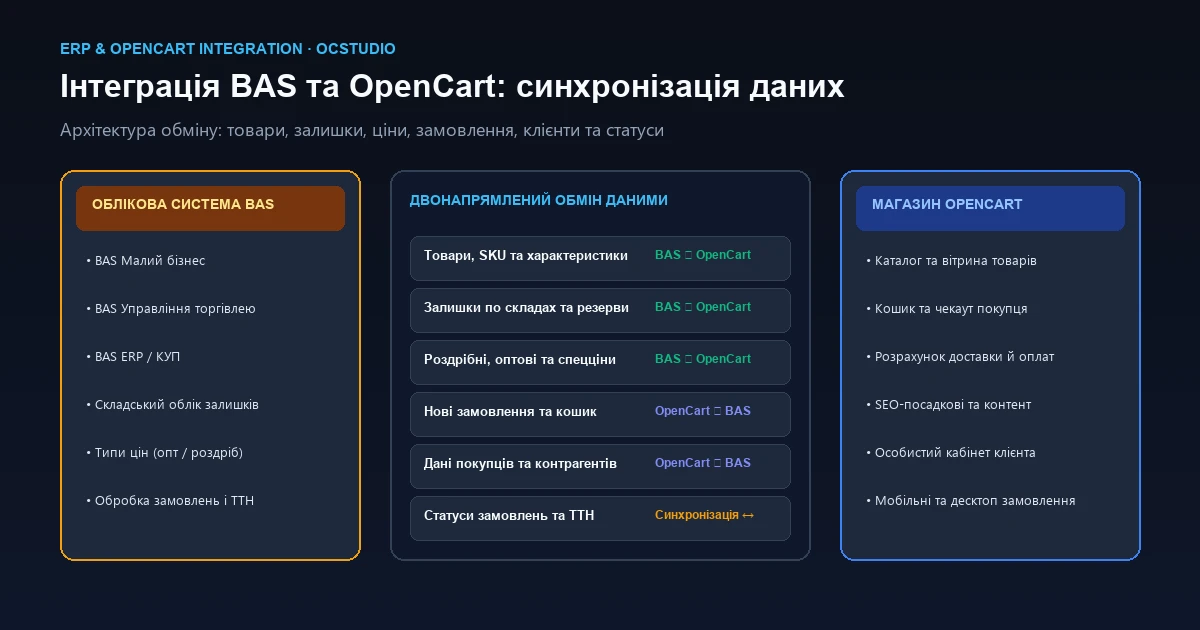
Where to Start: The Core Engineering Principle of ERP Integration
A frequent mistake among eCommerce managers is assuming integration boils down to: BAS + commercial module + OpenCart = automated store. In reality, hasty module installations without data planning often lead to broken checkout flows, zeroed out stock levels, or beautifully formatted SEO titles being overwritten by warehouse abbreviations like «Sneak. wmn. mod. 12/4 wht (bx 12 pcs)».
A resilient integration begins with business process and data governance definitions. You must formalize which system owns product creation, who governs inventory availability, what constitutes a valid order trigger, and how systems recover when network connections drop.
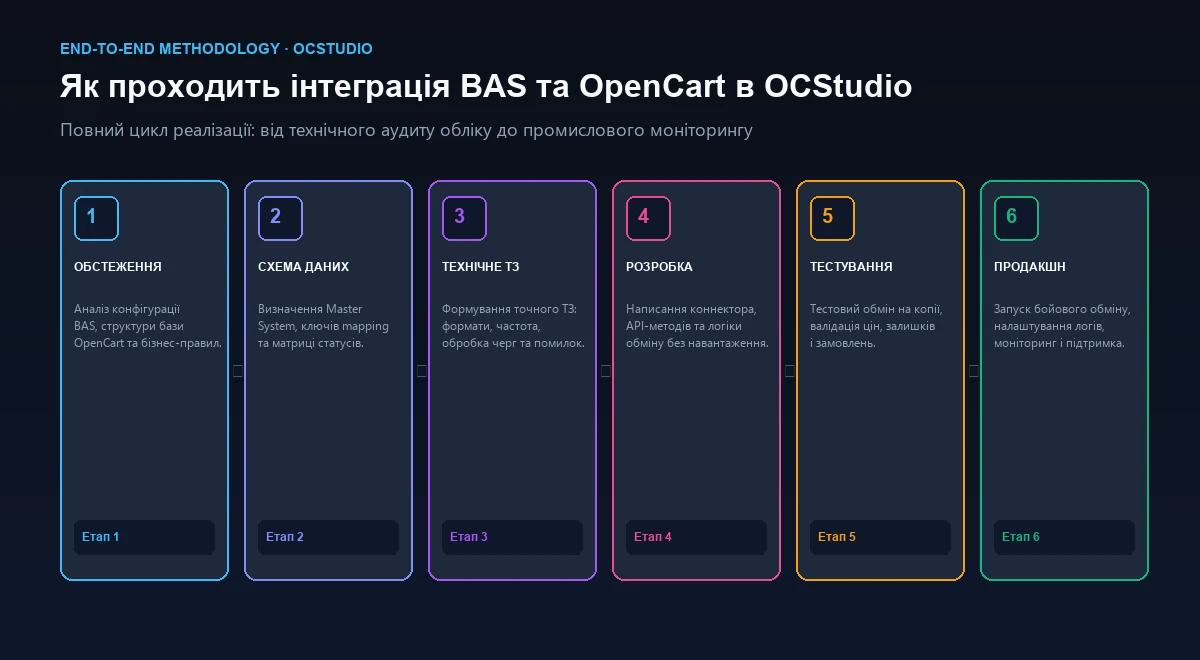
Business Processes ➔ Data Scope ➔ Source of Truth (Master System) ➔ Exchange Direction ➔ Product Identification Keys ➔ Pricing & Warehouse Rules ➔ Sync Cadence ➔ Protocol Selection ➔ Staging Testing ➔ Logging & Alerting ➔ Production Deployment ➔ Monitoring.
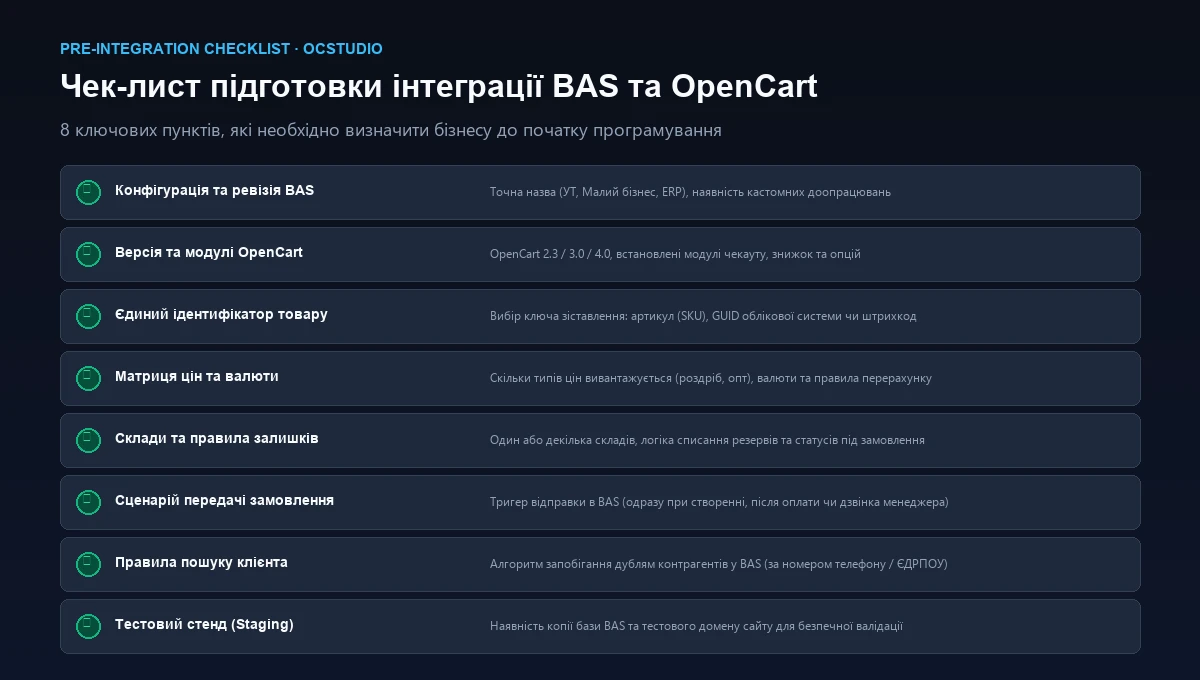
Identify Your Specific BAS Configuration & OpenCart Version
The term «BAS» covers a broad ecosystem of enterprise software products. Each configuration features distinct database schemas, document models, and accounting mechanics, requiring tailored integration logic.
What Must Be Clarified About Your BAS Installation:
- Exact Product Edition: «BAS Small Business» (streamlined inventory, buyer orders), «BAS Trade Management» (complex warehouses, pricing tiers, and delivery contracts), or enterprise-grade «BAS ERP / Management Company».
- Customization Degree: is the configuration completely standard (stock), or has it been customized by internal developers? (Any modification to standard product registers directly impacts connector logic).
- Infrastructure Model: file-based database or client-server architecture powered by MS SQL / PostgreSQL? Client-server setups unlock high-speed background HTTP endpoints, whereas file databases require controlled, scheduled sync jobs.
- System Ownership: presence of an internal BAS administrator or certified partner capable of configuring background services and opening API ports.
OpenCart Audit Points:
- Engine Version: OpenCart 2.3, 3.0, or 4.0 (or ocStore). Event listeners, controllers, and core database tables differ considerably between versions.
- Checkout Architecture: standard single-page checkout or third-party extensions (Simple Checkout, UniCheckout)? Custom fields such as tax numbers or pickup locker addresses must accurately map to BAS counterpart fields.
- Product Extensions: usage of related options, volume tier discounts, multi-currency, or multi-warehouse plugins.
What Data Needs to be Synchronized: Stream Directions
Attempting to synchronize everything bidirectionally creates deadlocks and data corruption. Each data entity must have an unambiguous direction of flow.
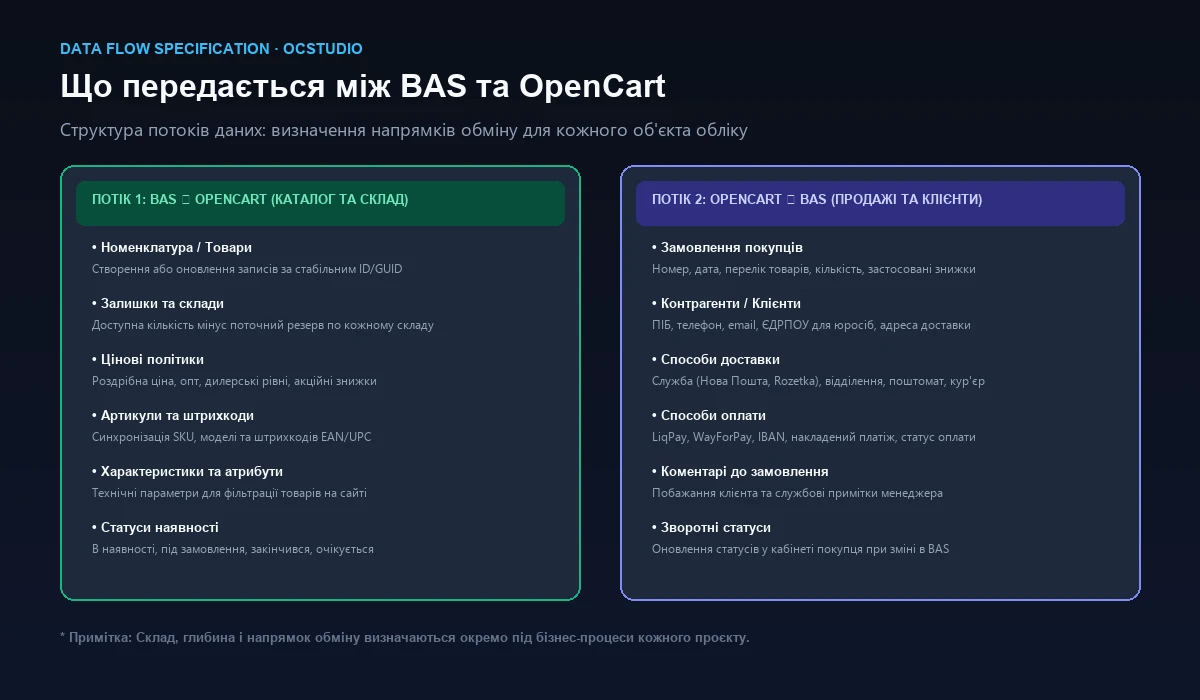
Stream 1: BAS ➔ OpenCart (Catalog, Pricing & Inventory)
- Product records, SKUs, and barcode numbers (EAN).
- Prices: retail, wholesale, and promotional tiers with multi-currency conversions.
- Stock balances: net available quantity minus active reservations per warehouse.
- Technical attributes (dimensions, power rating, weight) powering catalog filters.
- Availability statuses («In Stock», «Backorder», «Discontinued»).
Stream 2: OpenCart ➔ BAS (Orders & Customer Profiles)
- Customer orders: cart items, quantities, finalized website pricing, and discounts.
- Customer data: full name, phone number, email, company legal name, and tax ID.
- Fulfillment details: shipping courier, destination branch, delivery locker, or door-to-door address.
- Payment information: gateway status (LiqPay, WayForPay, IBAN, cash on delivery) and transaction ID.
- Customer order notes and management comments.
Where Does Ground Truth Reside? Establishing Master Systems
The Master System rule specifies which software platform holds authority over a specific database field. When both systems are allowed to modify the same field concurrently without arbitration, data loss is inevitable.
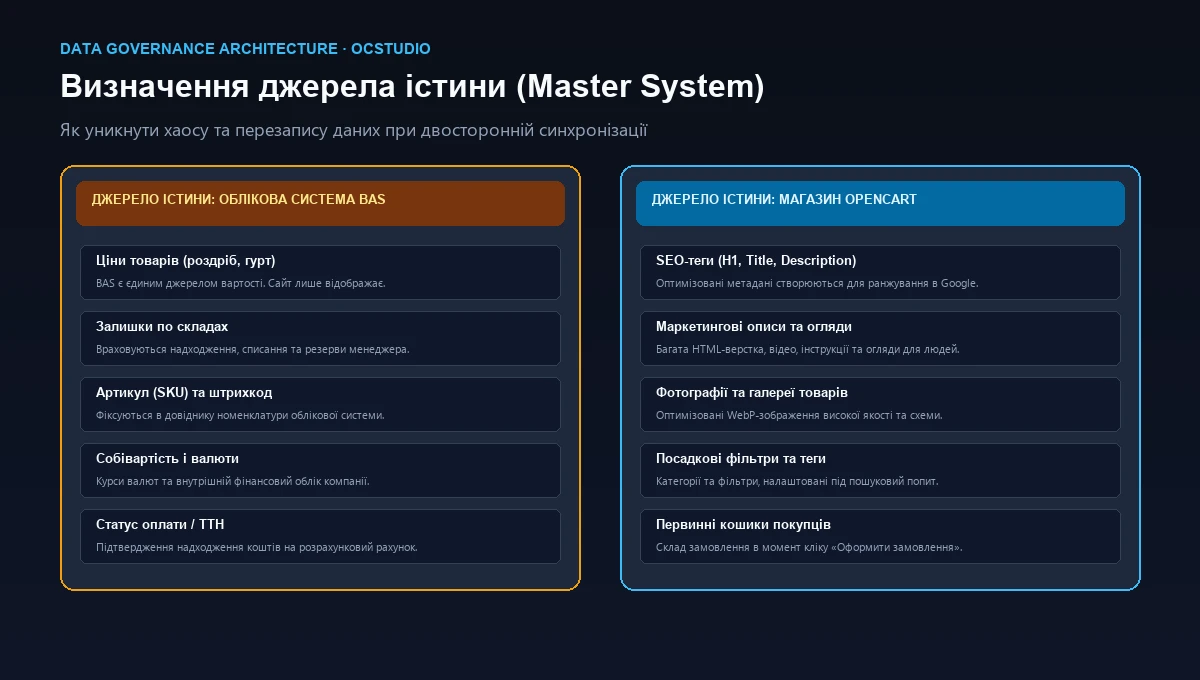
Master System Governance Matrix:
| Data Entity / Field | Master System | Flow Direction | Architectural Rationale |
|---|---|---|---|
| Product Prices (Retail / B2B) | BAS | BAS ➔ OpenCart | Pricing is managed by finance, tied to supplier invoices and currency rates. |
| Stock Quantities | BAS | BAS ➔ OpenCart | Accounts for supplier receipts, physical warehouse transfers, and offline reservations. |
| Product SKU & Barcode | BAS | BAS ➔ OpenCart | Serves as the unique logistical identifier for scanner guns and delivery notes. |
| Descriptions & HTML Copy | OpenCart | Do not overwrite from BAS | ERP descriptions are brief and technical; the website requires rich customer-facing copy. |
| SEO Metadata (H1, Title, Meta) | OpenCart | Do not overwrite from BAS | Engineered by SEO specialists for search rankings; must remain protected from ERP overwrites. |
| Media Galleries & Photos | OpenCart | Do not sync through BAS | Storing high-res WebP media in BAS bloats ERP database size and degrades system memory. |
| Cart & Order Contents | OpenCart | OpenCart ➔ BAS | Captures the exact buyer selection at the precise moment of online checkout. |
| Order Fulfillment Status | Synchronized | BAS ➔ OpenCart | When packages are shipped with tracking numbers, the status updates in customer accounts. |
Product Resolution: Identifier Keys & Duplicate Prevention
The central technical challenge in any eCommerce integration: how do OpenCart and BAS recognize that they are referencing the exact same SKU? Matching items by product title is a guaranteed disaster: changing a character, space, or hyphen in BAS will trigger the creation of a duplicate product card with a new URL on the website, damaging Google organic rankings.
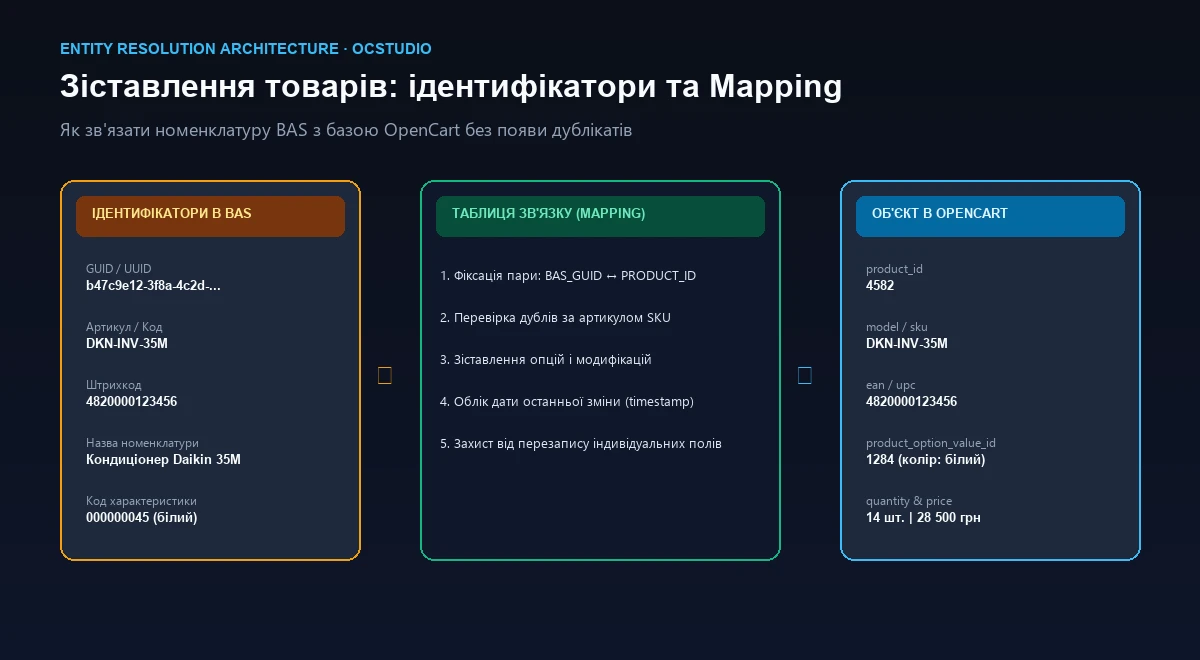
Robust Matching Key Options:
- Universal GUID / UUID: immutable global record identifiers generated by BAS (e.g.,
b47c9e12-3f8a-4c2d-...). If an operator updates the SKU, title, or category in BAS, the website linkage remains unbroken. - Unique SKU (Stock Keeping Unit): viable provided the organization enforces strict catalog discipline ensuring no two items ever share an identical SKU.
- Intermediary Mapping Table: an enterprise-grade architectural pattern maintaining a relational table of
bas_guid ↔ opencart_product_id. Enables connecting legacy website products with a freshly deployed ERP without altering existing web URLs.
Handling Variants & Attributes (Sizes, Colors)
In ERP systems, items are frequently recorded as single products with attribute variants (e.g., shoe models with sizes 38 through 45). On OpenCart, this maps to two architectural models:
- Native OpenCart Options: single product card where customers select their size from a dropdown, mapping individual stock levels to
oc_product_option_value. - Individual Product Cards: each size or color operates as a distinct URL/SKU linked via series modules, with integration logic updating individual card inventories.
Pricing and Inventory: Avoiding Overselling Traps
Pricing is More Than a Single Numeric Field
Define your commercial pricing rules before writing connector code:
- Tiered Pricing Groups: standard retail prices for anonymous visitors alongside wholesale/dealer rates assigned to authenticated B2B customer groups.
- Promotions & Specials: sale prices with start and end dates mapped to the
oc_product_specialtable. - Multi-Currency Handling: when wholesale costs are calculated in EUR/USD within BAS, the connector can either convert amounts using internal exchange rates or pass currency codes for native OpenCart conversion.
Calculating True Available Inventory
Directly displaying raw warehouse totals leads to overselling out-of-stock items. The eCommerce available inventory formula:
For multi-warehouse businesses, specify whether the storefront aggregates total stock across all locations or displays localized availability based on customer shipping destination.
Orders & Customer Management: Clean Routing Without Duplicates
When Should Orders Transmit to BAS?
Selecting order dispatch triggers impacts warehouse workflows:
- Instant Dispatch (On Creation): sales teams receive orders immediately. Downside: abandoned or test orders clutter ERP registers.
- Post-Payment Confirmation: ideal for prepaid orders and high-velocity stock turnarounds.
- Manager Approval Trigger: transmission occurs once staff set the status to «Confirmed» in the OpenCart dashboard.
Preventing Customer Duplicate Proliferation
Repeat customers must not spawn new contact records in BAS. Automated deduplication algorithms evaluate incoming data:
- Consumer Key: normalized mobile phone numbers formatted to
+380XXXXXXXXX. - Corporate Key: official business registration or VAT numbers.
- When matches exist, orders attach to the existing customer profile while appending new delivery destinations to their address book.
Order Status Synchronization Matrix
| OpenCart Status | BAS Document Status | Sync Direction | Triggered System Action |
|---|---|---|---|
| Pending Review | New / Unconfirmed | OpenCart ➔ BAS | Creates Buyer Order document in unposted state. |
| Processing (Paid) | To Fulfill / In Progress | OpenCart ➔ BAS | Allocates warehouse stock reservations. |
| Packed | Ready to Ship | BAS ➔ OpenCart | Sends customer SMS/email confirmation of parcel readiness. |
| Shipped (With Tracking) | Shipped / Closed | BAS ➔ OpenCart | Injects tracking code into OpenCart order record. |
| Cancelled | Cancelled | Bidirectional | Releases warehouse reservations back to online availability. |
Integration Protocols, Sync Intervals, and Fault Tolerance
Selecting exchange protocols depends on throughput demands and hosting infrastructure.
Exchange Methodologies:
- REST API (Recommended): modern, high-speed JSON endpoints. OpenCart provides API handlers while BAS executes direct HTTP calls via webhooks or timed workers.
- BAS HTTP Services: endpoints published on IIS or Apache within the BAS environment, allowing OpenCart to push orders directly.
- File-Based Exchange (CommerceML / XML / JSON): legacy batch processing via FTP. Resilient but slow for inventories exceeding 20,000 SKUs.
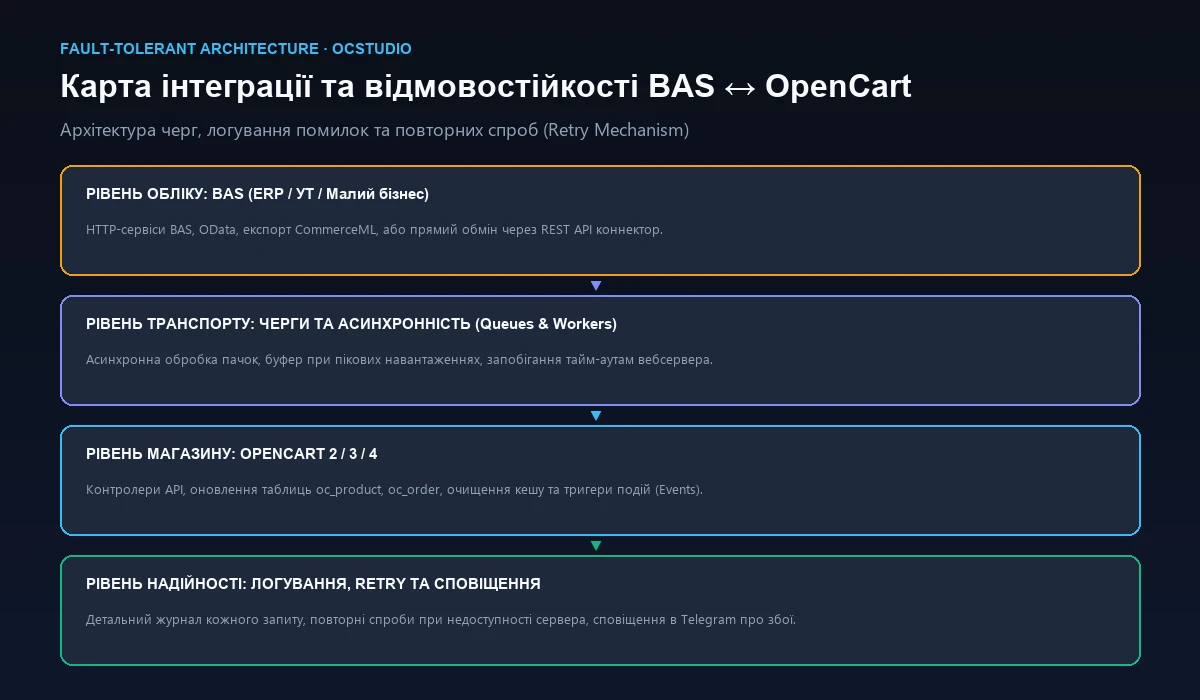
What Happens When BAS or Website Servers Experience Downtime?
Network interruptions, power outages, and database maintenance are everyday realities. High-availability integrations are engineered for failure:
- Message Queue Architecture: when BAS is unreachable, OpenCart queues orders in local staging tables and flushes them automatically upon recovery.
- Request Idempotency: payload hashes prevent repeated network transmissions from producing duplicate orders or double-deducting warehouse stock.
- Audit Logging & Telemetry: structured logs capture every synchronization error, forwarding critical alert notifications directly to development staff in Telegram.
Practical Specification Template for Business Owners
Prior to contacting development agencies, complete this preliminary technical matrix to streamline discovery:
| Data Entity | Source | Destination | Trigger / Interval | Match Key | Business Governance Rule |
|---|---|---|---|---|---|
| New Products | BAS | OpenCart | Daily or manual trigger | Nomenclature GUID | Create in disabled status awaiting marketing review. |
| Prices | BAS | OpenCart | Every 30–60 min or on change | Product SKU | Update retail and wholesale prices; protect descriptions. |
| Stock Balances | BAS | OpenCart | Every 5–15 minutes | Product SKU | Aggregate available stock across primary warehouses minus active reserves. |
| Orders | OpenCart | BAS | Instant (Real-time Webhook) | Order ID (order_id) | Generate Buyer Order document and allocate stock reservations. |
| Customer Profile | OpenCart | BAS | Bundled with Order | Phone / Tax Code | Match existing contact; instantiate new account if unrecorded. |
How OCStudio Executes BAS & OpenCart Integrations
We avoid generic plugins. Our engineering team designs custom connectors tailored to your exact database schema, drawing upon years of high-load eCommerce experience.
Verified OCStudio Integration Case Studies:
Garden Line Case: OpenCart Modernization with Continuous 1C/BAS Sync
Re-platforming of specialized irrigation store Garden Line (view case study). Key challenge: performing a major CMS overhaul while preserving continuous inventory and pricing synchronization with accounting software without downtime or URL changes.
Le-Mon Shop Case: Synchronizing 18,000+ Apparel Items with 1C/BAS
Full migration and automation of fashion hypermarket Le-Mon Shop (view case study). Deployed bidirectional synchronization across 18,000+ active clothing items with multi-size options, real-time checkout transmission, and dynamic pricing updates.
Common Mistakes in BAS and OpenCart Integrations
❌ Buying Modules Before Mapping Processes
A module is merely a data conduit. Without governance over prices, warehouses, and order statuses, connectors rapidly multiply errors across both systems.
❌ Matching Products by Title String
Any incidental character edit in BAS severs data links and spawns duplicate products on the site, diluting catalog rankings.
❌ Failing to Designate Master Systems
Allowing both systems to modify descriptions and titles causes carefully crafted SEO copy to be wiped out by warehouse abbreviations.
❌ Overlooking Active Stock Reservations
Syncing gross physical quantities without deducting pending orders causes overselling and frustrated buyers.
❌ Ignoring Customer Deduplication
Instantiating a new ERP counterparty on every checkout bloats databases with thousands of duplicates, crippling CRM workflows.
❌ Routing Heavy Media Files Through BAS
Pushing hundreds of gigabytes of imagery into accounting databases degrades server performance and exhausts memory.
❌ Operating Without Transaction Logs
Treating integration as an opaque black box means price export failures remain undiscovered until customers purchase underpriced items.
❌ Testing Directly on Production Environments
Running unverified integration scripts on live storefronts can wipe categories or corrupt thousands of live orders in minutes.
Frequently Asked Questions About BAS & OpenCart Integration (FAQ)
Can you integrate BAS with OpenCart using an off-the-shelf free module?
Pre-built generic modules only function reliably on plain, vanilla OpenCart installations connected to unmodified default BAS configurations. If your store utilizes custom checkouts (such as Simple), advanced options, multi-currency pricing, or customized ERP documents, generic connectors often cause data corruption, duplicate products, or fatal sync errors. Bespoke integration design is critical for production reliability.
Which BAS configuration is best suited for an OpenCart eCommerce store?
For small to mid-sized businesses with straightforward inventory, 'BAS Small Business' is ideal. For larger operations managing multiple warehouses, multi-tier wholesale pricing, and complex logistics, 'BAS Trade Management' or 'BAS ERP' is recommended. Integration can be engineered for any configuration by mapping document schemas accordingly.
How do you prevent ERP sync from overwriting rich product descriptions and photos on the site?
By enforcing strict Master System boundaries. If content is authored by merchandising and SEO teams on the website, the integration connector strictly forbids BAS from overwriting product names, HTML descriptions, image galleries, and SEO tags. BAS only acts as master for prices, stock quantities, and SKU identifiers.
What happens if internet connectivity drops on the BAS server during peak sales?
Fault-tolerant architectures implement queue mechanisms and retry policies. Orders are buffered safely in OpenCart and transmitted to BAS once connectivity is restored. Request idempotency ensures that repeated network retries never generate duplicate sales orders or double-deduct inventory.
How long does it take to prepare and deploy a BAS and OpenCart integration?
Technical discovery, architecture mapping, and data schema agreement typically take 3 to 5 business days. Development, staging validation, and production cutover usually take between 1 to 3 weeks depending on business logic complexity and custom ERP modifications.
Conclusion
A professional BAS and OpenCart integration is a strategic milestone in eCommerce growth. It eliminates hundreds of manual order processing hours, eliminates transcription errors, and protects customers from purchasing out-of-stock items.
The foundation of reliable automation lies in thorough pre-integration design: establish Master System rules, match products via stable keys, map order workflows, and partner with engineers who possess deep technical mastery of OpenCart architecture.
Connect BAS and OpenCart Without Sync Errors or Duplicates
Share your store URL and specify your BAS configuration. OCStudio engineers will evaluate your requirements, design an optimal exchange protocol, and provide a transparent project roadmap.