
How to Configure OpenCart SEO: Step-by-Step Roadmap
An engineering guide to eCommerce search engine optimization: why meta tags and backlinks fail without resolving core duplicates, how to configure SEO Pro, deploy faceted filter landing pages, implement Schema.org, and build long-term store rankings.
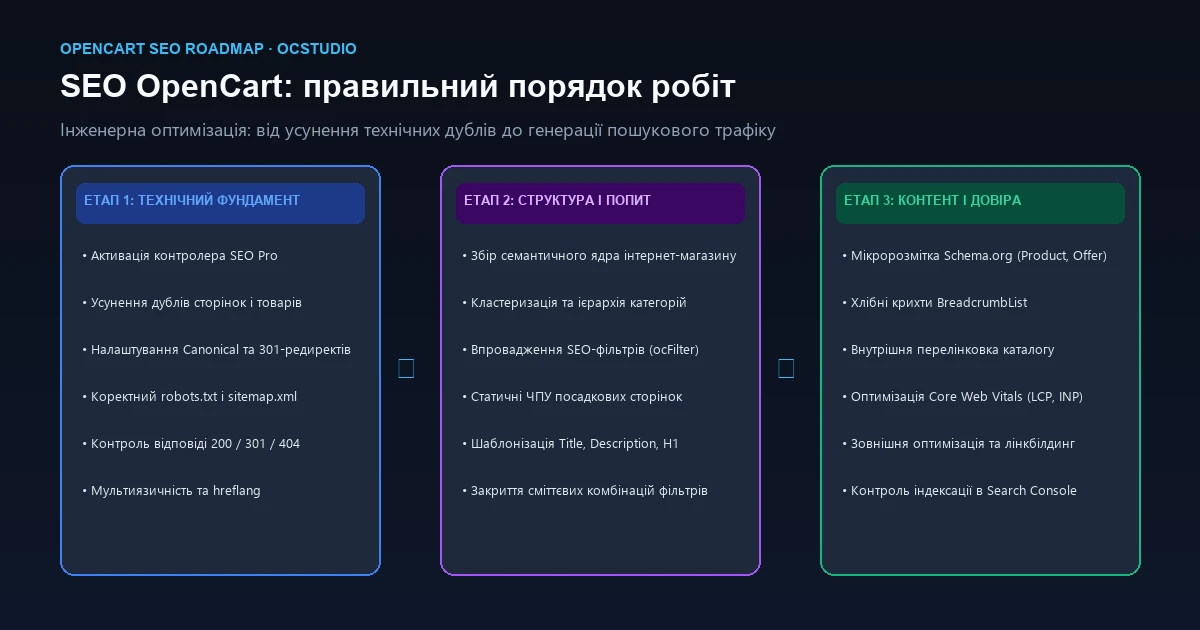
Why Execution Order in OpenCart SEO Determines Success or Failure
A frequent pitfall among store owners is executing SEO tasks in reverse. Many begin by outsourcing dozens of category texts, buying random backlinks, or purchasing automatic meta-tag generators, expecting instant visibility in Google. Yet months later, keyword positions remain stagnant or drop.
The root cause lies in core CMS architecture. OpenCart adheres to a strict hierarchy of technical dependencies: no amount of content or backlinks can compensate for severe indexation flaws. If Googlebot exhausts its crawl budget on duplicate category trees, sorting parameters, and service queries, your optimized landing pages will either remain uncrawled or be dismissed as low-value duplicates.
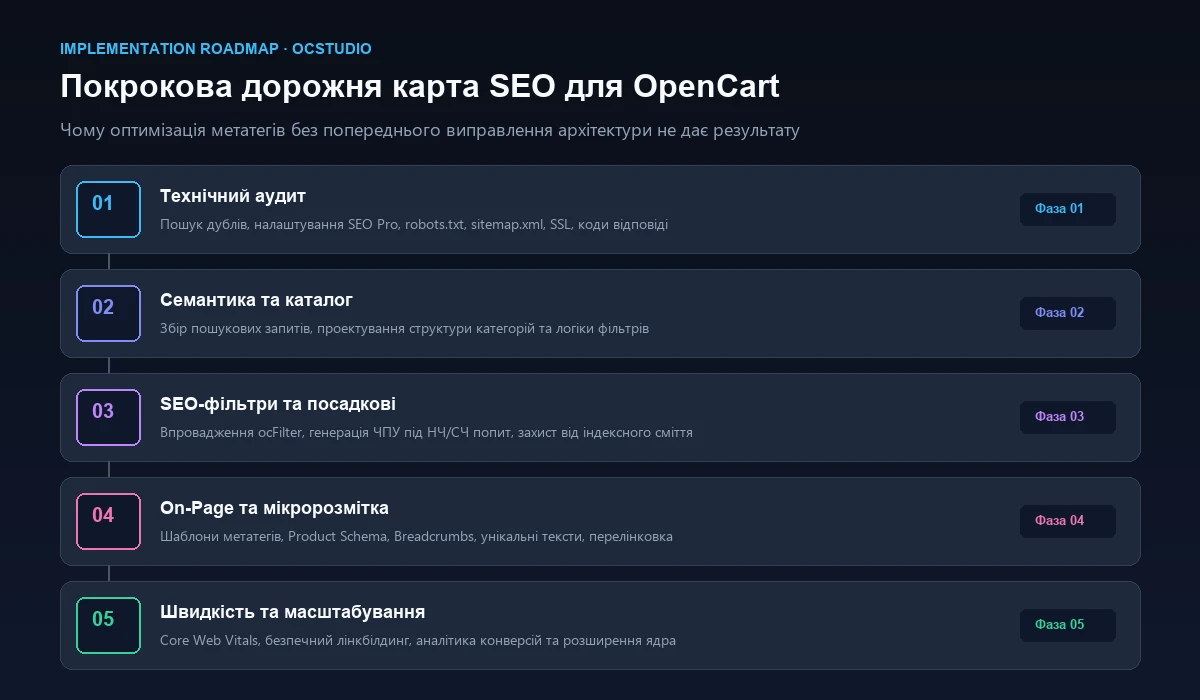
Phase 1: Technical SEO Audit & Resolving OpenCart Duplicates
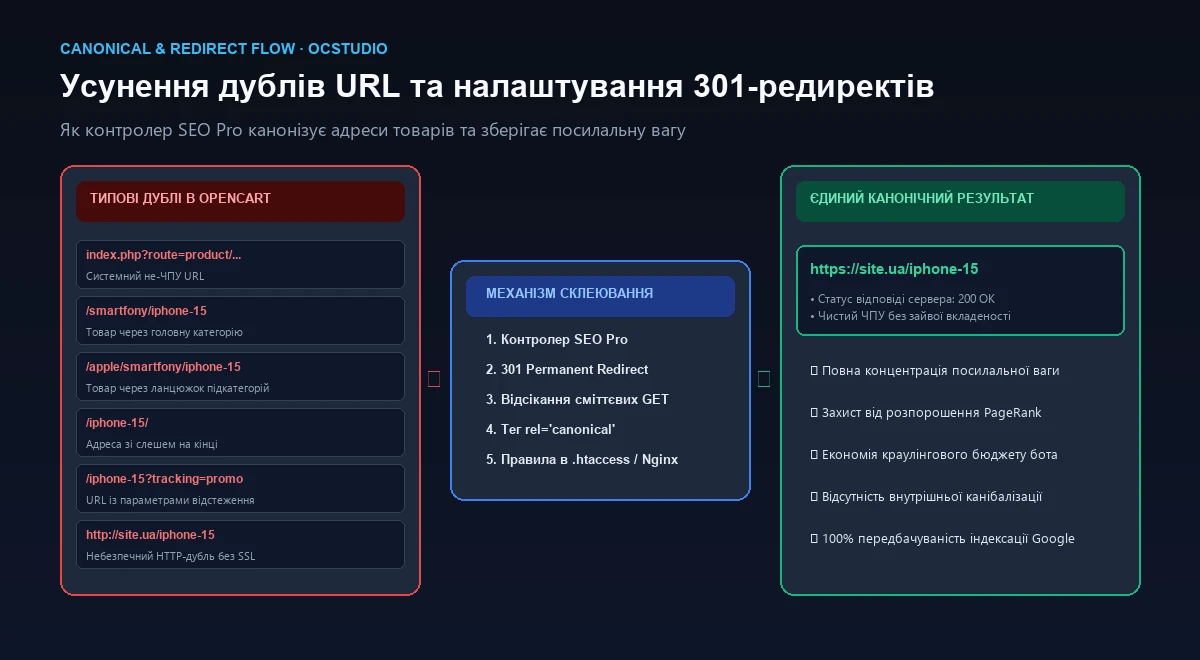
Out of the box, default OpenCart suffers from a major structural flaw: a single product or category is accessible under multiple distinct URLs simultaneously. Search engines treat these as separate duplicate documents, diluting page authority (PageRank) and triggering internal keyword cannibalization.
Common OpenCart Duplicates That Must Be Eliminated:
- Product accessible via category paths and direct: e.g.,
/smartphones/apple/iphone-15alongside/iphone-15or/mobile/iphone-15. - Non-SEF system URLs: routes such as
/index.php?route=product/product&product_id=125indexed alongside human-readable URLs. - Trailing slash discrepancies: coexistence of
/category/and/category. Without strict 301 canonicalization, Google sees these as two separate pages. - Sorting and limit query strings: parameter combinations like
?sort=p.price&order=ASC,?limit=100,?sort=rating.
Why Default seo_url Fails and SEO Pro is Essential
The standard seo_url.php controller merely resolves records in the oc_seo_url table; it does not enforce canonicalization or issue 301 redirects. When bots request non-canonical or outdated paths, it returns a 200 OK status instead of redirecting.
The SEO Pro controller resolves this at the framework level:
- Establishes a single authoritative canonical URL per product (typically a clean, direct path).
- Emits 301 Permanent Redirects for all alternate category paths and raw system parameters.
- Enforces strict trailing-slash consistency, eliminating duplicate mirror pages.
Proper Handling of Catalog Pagination (?page=2)
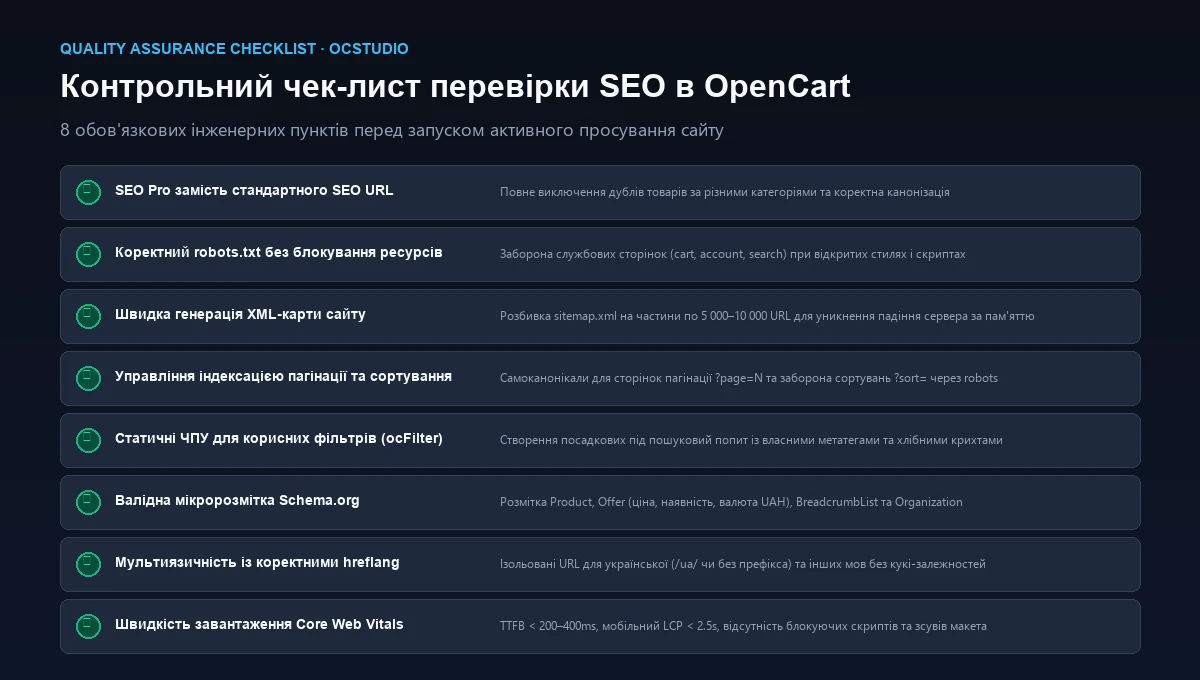
A frequent error is placing a noindex tag on pagination pages or setting rel="canonical" back to page 1. This harms indexing. Google ignores canonicals pointing to page 1 when contents differ, and noindexing pagination severs crawler discovery of items located past the first page.
The recommended standard: maintain indexable pagination pages with self-referencing canonicals (page 2 links to page 2), keep product links crawlable, and append dynamic title suffixes such as — Page 2 to prevent duplicate meta warnings.
Phase 2: Robots.txt Configuration, Sitemap.xml & Crawl Budget
Robots.txt and sitemap.xml dictate how search bots traverse your catalog. A syntax error in robots.txt can delist entire sections, while a sluggish sitemap exhausts server memory.
Optimized Robots.txt for OpenCart
Default OpenCart robots.txt files frequently block /catalog/view/javascript/ or /catalog/view/theme/. This breaks rendering: Googlebot must access CSS and JavaScript to compute layout stability and mobile compatibility.
Scalable XML Sitemaps for Large Catalogs
The native Google Sitemap feed generates XML on the fly with a single monolithic SQL query. For stores with 10,000+ items, this triggers 504 Gateway Timeouts or PHP out-of-memory errors.
Architecture requirements:
- Split sitemaps into modular files (categories, manufacturers, products partitioned into 5,000–10,000 items) coordinated by a master
sitemapindex. - Pre-generate static XML via Cron or cache responses in Redis.
- Include strictly canonical URLs returning 200 OK (exclude 301 redirects, 404s, and noindexed URLs).
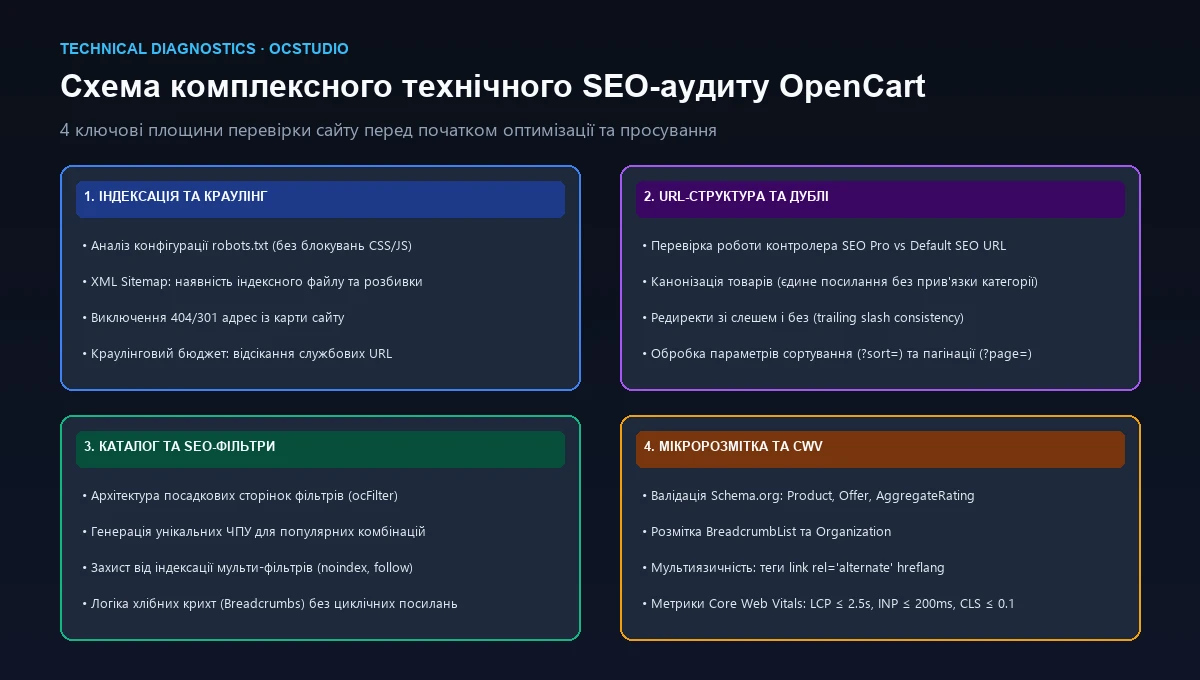
Diagnostic Matrix: Technical OpenCart Symptoms
| Observed Symptom | Probable CMS Root Cause | Initial Inspection Step | Risk Level |
|---|---|---|---|
| Products dropping from index | Pagination blocked in robots.txt or missing in sitemap.xml | Check robots.txt directives, verify self-canonicals, check GSC | Critical |
| Millions of indexed URLs in GSC | Indexation of filter permutations, sorting, or session parameters | Review noindex rules for filters, disallow sorting, verify SEO Pro | Critical |
| Low snippet CTR in search | Missing or invalid Product and AggregateRating microdata | Run Rich Results Test; verify price, currency, and availability | Moderate |
| Rankings plummet after URL update | Absence of 301 redirects from legacy paths to new SEO URLs | Inspect 404 server logs, implement redirect map in .htaccess/module | Critical |
| Googlebot misses alternate language | Cookie-based language toggles lacking discrete static URLs | Verify /en/ prefixes and reciprocal link rel="alternate" hreflang tags | High |
Phase 3: Semantic Keyword Research & Catalog Architecture
An eCommerce site must deliver precise landing pages aligned with search intent. A frequent error is mirroring the category tree from warehouse ERPs, which are structured for logistics rather than customer intent.
Hierarchy of Search Demand:
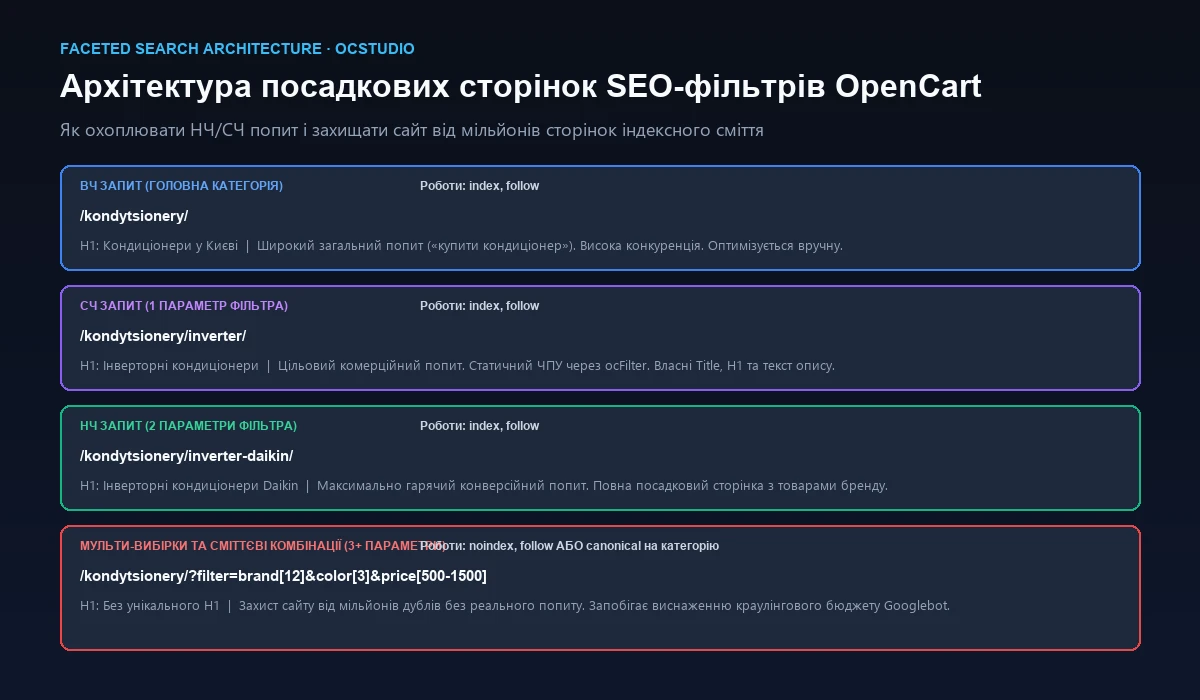
- Head Keywords (High Volume): broad queries like "air conditioners" or "women's sneakers" mapped to top-level category pages.
- Mid-Tail Queries: refined intent such as "inverter air conditioners" or "multi-split systems", mapped to subcategories and primary filter landing pages.
- Long-Tail Queries: high-intent commercial queries with specific brands or attributes: "Daikin inverter air conditioners heating -25C". This segment yields the highest conversion rates and is captured through faceted SEO filter landing pages.
Read more in our guide on OpenCart Catalog Structure and Filter Architecture.
Phase 4: Faceted SEO Filters (ocFilter): Capturing Long-Tail Demand
In mature online stores, 70–80% of transactional traffic stems from granular attribute combinations. Default OpenCart either renders query strings (?filter=12,45) or relies on asynchronous AJAX without URL updates, preventing search crawlers from discovering filtered collections.
Implementing Faceted Filter Landing Pages
Faceted filter optimization delivers targeted landing pages:
- Static SEO URLs: converting raw query parameters into clean static slugs:
/air-conditioners/inverter-daikin/. - Unique On-Page Metadata: generating dedicated H1 tags, optimized Titles, Descriptions, and concise introductory copy for each qualified combination.
- Accurate Breadcrumbs: constructing logical navigation hierarchies
Home / Air Conditioners / Inverter / Daikinwith BreadcrumbList schema. - Index Bloat Safeguards: arbitrary selections (3+ parameters, price sliders) are blocked with
noindex, followor canonicalized to the parent category to protect crawl budget.
Phase 5: On-Page Optimization & Dynamic Meta Templates
In catalogs with thousands of SKUs, writing manual metadata across every item is unfeasible. We implement a two-tiered model: dynamic templating for scale, complemented by bespoke copywriting for the top 20% high-margin products and categories.
Effective OpenCart Metadata Templates:
- Product Page:
Title:Buy [Product Name] [SKU] for [Price] | [Store Name]
Description:[Product Name] priced at [Price] in stock. Manufacturer warranty, customer reviews, specs, and rapid shipping. Order online at [Store Name]! - Category Page:
Title:[Category Name] — Buy Online: Catalog & Prices from [Min Price] | [Store Name]
Description:Explore our extensive [Category Name] selection. Prices starting at [Min Price], official warranty, and verified reviews. Fast delivery! - Filter Landing Page:
Title:[Attribute] [Category] [Brand] — Best Deals Online | [Store Name]
H1:[Attribute] [Category] [Brand]
Internal Linking Optimization
Strategic internal linking distributes PageRank and guides user discovery:
- Related & Compatible Products: cross-sell widgets on product pages.
- Popular Facet Collections: contextual link blocks in footers and category sidebars.
- Breadcrumb Trails: structured navigation without cyclic self-links on terminal nodes.
Phase 6: Structured Data & Schema.org Microdata
Structured data provides search engines with explicit cues about page content, powering eye-catching Rich Snippets with pricing, stock status, star ratings, and review counts.
Core Schema Entities for eCommerce:
- Product + Offer: communicates item name, description, brand, SKU, images, price (
price), currency (priceCurrency: USD), and stock status (InStock / OutOfStock). - AggregateRating: shows average score and review counts, improving search CTR by 15–30%.
- BreadcrumbList: replaces plain URLs in search results with structured navigation trails.
- Organization & WebSite: reinforces brand identity and enables Sitelinks Searchbox features.
priceValidUntil or duplicate product definitions). Implementing clean JSON-LD in the document <head> is strongly recommended.
Phase 7: Multilingual SEO, Hreflang & Core Web Vitals
Multilingual Architecture
Many stores implement language switching via sessions or cookies without discrete URLs. Because Googlebot crawls without session state, alternate languages remain completely invisible to the search engine.
Multilingual Best Practices:
- Each language must reside on its own static URL path (e.g., default language on root, secondary languages under
/en/or/ru/). - All corresponding pages must include reciprocal
<link rel="alternate" hreflang="en" href="..." />tags. - An
hreflang="x-default"tag should indicate the primary international fallback.
Core Web Vitals Impact on Rankings
Page speed and rendering stability are confirmed ranking signals. Stores with slow server responses (TTFB > 1s) or layout shifts (CLS) experience suppressed mobile visibility.
- LCP (Largest Contentful Paint) ≤ 2.5s: time to render the primary hero banner or product image.
- INP (Interaction to Next Paint) ≤ 200ms: UI responsiveness to user clicks and filter selections (replaced legacy FID).
- CLS (Cumulative Layout Shift) ≤ 0.1: visual stability during font and banner rendering.
Read our in-depth diagnosis in Why OpenCart is Slow and How to Fix It or review our OpenCart Speed Optimization Services.
Verified OCStudio Experience: Case Studies in SEO Preservation & Growth
OCStudio engineers deliver tailored results across catalogs of all sizes, from boutique brand stores to large-scale marketplaces:
Garden Line Case: OpenCart Re-platforming with Organic SEO Equity Retention
The client engaged OCStudio to modernize irrigation eCommerce store Garden Line (view case study). With years of established domain authority, mitigating traffic loss during platform re-engineering was paramount.
We compiled a comprehensive 301 redirect map for legacy URLs, enforced trailing slash consistency, cleaned duplicate paths, and established seamless 1C/BAS synchronization without altering URL architecture.
Le-Mon Shop Case: Seamless Marketplace Migration from Prom to OpenCart
A complete eCommerce migration of fashion store Le-Mon Shop (view case study) from a hosted platform to an independent OpenCart installation. Goal: preserving rankings across thousands of items while constructing a faceted SEO filter system.
What NOT to Do During OpenCart SEO Optimization
Unsound optimizations frequently trigger indexing penalties or catalog instability:
❌ Stacking Multiple SEO Modules Concurrently
Installing multiple all-in-one SEO packages alongside SEO Pro creates OCMOD conflicts, duplicate database queries, and infinite 301 loops.
❌ Generating Spun Machine Content
Low-quality spun category texts are easily recognized by Google algorithms, diluting domain helpfulness and quality scores.
❌ Indiscriminately Indexing All Filter Combos
Allowing unconstrained indexation of arbitrary filter selections spawns millions of thin pages, exhausting Googlebot's crawl budget.
❌ Placing noindex on Pagination Pages
This severs crawler discovery paths, gradually de-indexing items shelved on secondary catalog pages.
❌ Changing URLs Without 301 Redirects
Any slug alteration without permanent redirects produces 404 errors, erasing historic backlink equity.
❌ Retaining Default Unedited robots.txt
Default configurations block crawler access to theme stylesheets and scripts, preventing accurate mobile-friendliness evaluation.
How OCStudio Executes OpenCart SEO Campaigns
We avoid surface-level checklists. Our work operates as an integrated engineering workflow where every technical modification is verified against crawler standards and buyer experience:
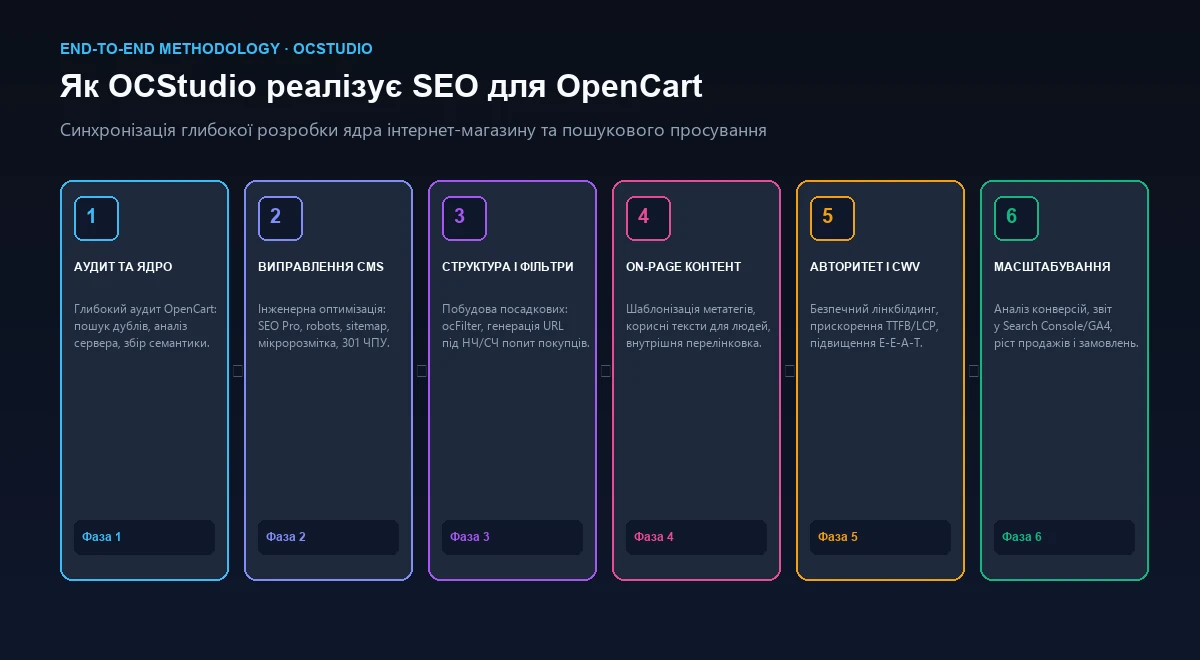
- CMS Core Technical Audit: deep database analysis, OCMOD review, HTTP status code checks, and crawl emulation.
- Architecture Remediation: configuring SEO Pro, eradicating duplicate mirrors, refining robots.txt, and partitioning sitemaps.
- Semantics & Faceted Filters: clustering target keywords, structuring category taxonomies, and configuring ocFilter landing pages.
- On-Page Templating: deploying dynamic metadata templates, refining copy, and implementing JSON-LD Schema.org.
- Authority & Core Web Vitals: enhancing performance metrics, securing authoritative backlinks, and reinforcing E-E-A-T trust signals.
- Analytics & Growth: tracking rankings in Google Search Console, measuring conversion funnels in GA4, and expanding keyword coverage.
Frequently Asked Questions About OpenCart SEO (FAQ)
Can you successfully optimize OpenCart for Google without SEO Pro?
It is strongly discouraged. The default seo_url.php controller in OpenCart does not control trailing slashes, does not eliminate product category duplicates, and fails to emit 301 redirects for non-canonical URLs. SEO Pro is an essential industry standard to eradicate duplicate URLs and safeguard crawl budget.
Why shouldn't pagination pages (?page=2) be blocked with noindex or robots.txt?
This is a critical mistake. Blocking pagination prevents Googlebot from crawling links to products located past page one, causing thousands of product cards to drop out of the index. The correct pattern is keeping pagination indexable with a self-canonical on each paginated URL.
How do you properly configure faceted SEO filters in OpenCart without wasting crawl budget?
Use specialized modules such as ocFilter that generate clean, static SEO URLs solely for filter combinations matching verified search intent (1–2 parameters, e.g., 'inverter air conditioners Daikin'). Each landing page must feature a unique H1, Title, and breadcrumbs. All long-tail, arbitrary multi-selections (3+ parameters) must be safeguarded with noindex, follow or canonicalized to the parent category.
Why does organic traffic often plummet after bulk URL rewrites in OpenCart?
Traffic loss typically stems from missing 301 permanent redirects from old URL structures to new ones. If URLs change and legacy paths return 404 Not Found, search engines de-index them, wiping out accumulated backlink equity. Every URL migration requires a comprehensive redirect matrix.
How long does a foundational technical OpenCart SEO setup take?
A comprehensive technical audit, fixing core CMS duplicates, configuring SEO Pro, canonicals, robots.txt, multi-part sitemaps, and Schema.org at OCStudio typically takes between 3 to 7 business days. Full faceted filter rollouts depend on the size of the catalog and product taxonomy.
Conclusion
Successful OpenCart SEO requires methodical engineering execution: resolving underlying duplicates, activating SEO Pro, filtering out crawl bloat, and publishing clean sitemaps before expanding content. Only on this stable foundation should faceted filters, copywriting, and link acquisition be scaled.
This disciplined roadmap ensures marketing investments yield measurable keyword gains, targeted search traffic, and sustained eCommerce revenue.
Does Your OpenCart Store Need Professional SEO Configuration?
Share your store's URL with our team. We will conduct a preliminary technical diagnostic, inspect duplicate path risks, and outline a tailored optimization roadmap.