
OpenCart vs WooCommerce: Choosing the Right E-Commerce Platform
In-depth engineering analysis comparing two dominant open-source e-commerce platforms: relational database efficiency vs WordPress EAV postmeta bloat, load endurance, 3-year TCO, and seamless migration.
When selecting an open-source framework for an online store, businesses frequently weigh OpenCart against WooCommerce. Both systems operate on PHP and MySQL, both are free from recurring platform licensing fees, and both offer thousands of extensions. Yet beneath the surface, their core architectures could not be more divergent.
OpenCart was created from the ground up as a dedicated, high-performance retail engine. WooCommerce was built as a commerce plugin grafted onto WordPress — a blogging CMS originally conceived for publishing articles. This architectural lineage dictates everything: catalog speed, server resource consumption, database scalability, and long-term maintenance costs.
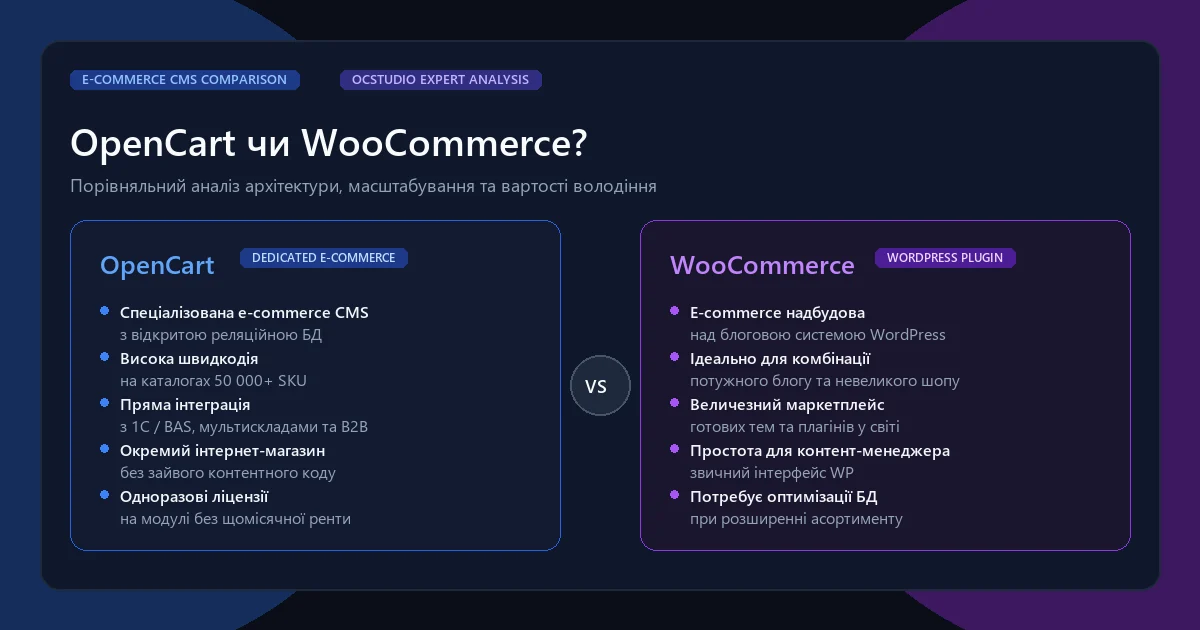
What is OpenCart: Advantages of a Dedicated E-Commerce CMS
OpenCart is a standalone, lightweight e-commerce platform built on a clean MVC-L (Model-View-Controller-Language) architectural pattern. It features native support for multi-store setups on a single codebase, multi-language data fields, tiered tax classes, and customer group pricing.
- Minimal Core Overhead: The core framework initializes with minimal memory consumption, rendering catalog pages in 150-350 milliseconds even on standard VPS hosting.
- Normalized Database Structure: Clear relational tables (
oc_product,oc_product_attribute,oc_order) allow high-speed indexed filtering across tens of thousands of SKUs. - One-Time Licensing Model: Extensions and templates are sold via perpetual lifetime licenses, eliminating annual recurring developer tax.
What is WooCommerce: Capabilities and Limits of a WordPress Plugin
WooCommerce is the most popular e-commerce plugin globally, powering millions of stores. It leverages the vast WordPress plugin directory and visual page builders (Elementor, Gutenberg), making it exceptionally attractive for non-technical creators building micro-shops with 20-100 products.
However, because WooCommerce operates inside WordPress, every web request loads the entire WordPress plugin stack, theme hooks, translation filters, and database options. As store volume scales, this overhead creates serious technical bottlenecks.
Fundamental Architecture & Database Differences
The decisive architectural difference lies in how both engines store product and order data in MySQL:
OpenCart: Relational Normalized Schema
Each commercial entity has its own dedicated, optimized table:
oc_product: Core attributes, SKU, quantity, dimensions, status.oc_product_description: Localized titles, descriptions, meta tags.oc_product_to_category: Fast indexed relational mapping.
A category query filtering 15,000 products by price, brand, and size requires clean indexed SQL queries executed in 0.005–0.02 seconds.
WooCommerce: WordPress Postmeta (EAV Model)
WooCommerce stores products as generic WordPress posts (post_type = 'product') in wp_posts, while all prices, attributes, and stock status are stored as key-value pairs in wp_postmeta.
For a store with 5,000 products and multiple attributes, wp_postmeta easily exceeds 500,000 to 1,000,000 rows. Filtering a catalog page requires multiple nested SQL LEFT JOIN clauses on the same massive table, causing server CPU spikes and TTFB delays of 1.5–4.0 seconds.
Detailed Comparison Table: OpenCart vs WooCommerce
| Parameter | OpenCart | WooCommerce |
|---|---|---|
| Platform Type | Standalone, dedicated e-commerce CMS | E-commerce plugin on top of WordPress CMS |
| Architecture Pattern | MVC-L (Model-View-Controller-Language) | WordPress Hook & Filter system (Action/Filter API) |
| Optimal Catalog Size | 500 to 200,000+ SKUs effortlessly | 10 to 3,000 SKUs (degrades on larger catalogs) |
| Native Multi-Language | Built into the core engine (oc_language) | Requires heavy paid plugins (WPML / Polylang) |
| Native Multi-Store | Yes (unlimited domains from one database) | Requires WordPress Multisite (complex maintenance) |
| Server Resource Usage | Low (Runs fast on $15-$30/mo VPS) | High (Requires $60-$150+/mo VPS with Redis & Object Cache) |
| Extension Licensing | One-time lifetime licenses ($25-$80) | Annual subscription model ($79-$299/year per plugin) |
| ERP / 1C / BAS Integration | Native direct bidirectional exchange | API REST sync with webhooks; requires custom bridge |
Performance, Loading Speed, and Core Web Vitals
Google Core Web Vitals (Largest Contentful Paint, Cumulative Layout Shift, Interaction to Next Paint) directly impact search rankings and customer conversion. In real-world production benchmarks:
- Time to First Byte (TTFB): An un-cached OpenCart page generates dynamic responses in 120–250ms. An un-cached WooCommerce page with 25 active plugins typically clocks 600–1800ms.
- Concurrency Under Load: During seasonal sales and marketing campaigns, an OpenCart server withstands 3–5× more simultaneous checkout sessions on identical CPU/RAM hardware compared to WooCommerce.
- Cache Dependence: WooCommerce relies heavily on static page caching (WP Rocket, LiteSpeed Cache). However, checkout, cart, and account pages cannot be cached. Under high traffic, WooCommerce checkout servers frequently experience slowdowns or 504 Gateway Timeouts.
SEO for Online Stores: OpenCart vs WooCommerce
Both platforms can rank high in Google, but their structural SEO ergonomics differ:
- Clean URL Taxonomy: OpenCart with SEO Pro delivers spotless hierarchical URLs (
domain.com/category/sub-category/product-name) without duplicate URL paths or canonical confusion. - SEO Filter Landing Pages: Modules like OCFilter allow OpenCart to generate thousands of clean, indexable landing pages based on attribute combinations (e.g., "Men's Leather Running Shoes Size 42") with custom H1, meta titles, and canonical tags. Achieving this in WooCommerce requires complex custom taxonomy plugins.
- Taxonomy Bloat in WordPress: WordPress easily generates massive duplicate index clutter via author archives, tags, date archives, and category paginations, wasting Google crawl budget unless rigorously suppressed.
Total Cost of Ownership (TCO) Over 1–3 Years
While both CMS platforms are free to download, real business costs emerge over time:
3-Year Financial Comparison (Store with 8,000 SKUs)
WooCommerce:
- Initial Setup & Theme Adaptation: $2,500 - $4,500
- Essential Official Plugin Annual Licenses (Subscriptons, Bookings, Shipping, Gateway, WPML): $850/year × 3 = $2,550
- Heavy VPS Hosting ($70/month): $70 × 36 = $2,520
- Ongoing Plugin Conflict Troubleshooting & Core Updates: $1,500/year × 3 = $4,500
- Total 3-Year TCO: ~$12,070 - $14,070
OpenCart:
- Turnkey Development & UI Customization: $3,200 - $5,500
- Lifetime Extension Licenses (One-time): $400
- Standard VPS Hosting ($25/month): $25 × 36 = $900
- Annual Support & Security Maintenance: $900/year × 3 = $2,700
- Total 3-Year TCO: ~$7,200 - $9,500
Conclusion: OpenCart delivers 30% to 45% lower total cost of ownership over three years, while delivering higher throughput and speed.
Who Should Choose WooCommerce vs Who Needs OpenCart
Choose WooCommerce If:
- Your store is secondary to a content-heavy blog or corporate media brand.
- Your catalog is small (fewer than 500 items) with simple variants.
- You already manage multiple WordPress sites and have in-house WP administrators.
- You sell digital downloads, software licenses, or simple bookings.
Choose OpenCart If:
- Your business is a dedicated retail operation with 1,000 to 200,000+ SKUs.
- You require deep multi-attribute filters (size, color, technical specs).
- You need seamless, automated synchronization with ERP, BAS, 1C, or CRM systems.
- You demand lightning-fast checkout without monthly plugin subscription fees.
Migrating from WooCommerce to OpenCart
If your growing store is experiencing database bottlenecks, checkout delays, or frequent plugin update crashes on WooCommerce, migrating to OpenCart is a strategic upgrade. OCStudio performs safe, seamless migrations with an established engineering checklist:
- Complete Data Audit: Validating product attributes, image relationships, category hierarchies, and customer order history.
- Automated Data Transfer: Exporting WooCommerce database entities and importing them into clean, normalized OpenCart MySQL tables.
- Strict 301 Redirect Mapping: Generating complete 1-to-1 redirect maps from legacy WooCommerce URLs (including product slugs and category paths) to OpenCart URLs to safeguard Google search equity.
- Payment & Logistics Setup: Integrating high-speed one-page checkout, local payment gateways, and automated delivery tracking.
Frequently Asked Questions (FAQ)
Why is OpenCart significantly faster than WooCommerce on medium and large catalogs?
OpenCart was engineered strictly as an e-commerce platform with a normalized relational database schema (dedicated tables for oc_product, oc_category, oc_order). WooCommerce sits on top of WordPress and stores all product attributes, prices, and orders in the generic wp_posts and wp_postmeta tables using an EAV pattern. On a catalog with 5,000 products, wp_postmeta often balloons to over 500,000 rows, requiring complex multi-table SQL JOINs for basic category filtering and severely degrading server response times.
Can an online store with 50,000+ products run smoothly on WooCommerce?
While theoretically possible with High-Performance Order Storage (HPOS), dedicated enterprise hosting, and heavy caching layers, maintaining a 50,000+ SKU store on WooCommerce requires constant developer intervention and expensive infrastructure. OpenCart natively manages 50,000 to 200,000+ products on modest VPS hardware ($20-$40/month) without database degradation.
How does multi-language and multi-currency support compare between OpenCart and WooCommerce?
OpenCart includes native multilingual and multicurrency support in its core architecture: each product, category, and attribute has distinct language records in the database. On WooCommerce, multi-language requires heavy third-party plugins (WPML, Polylang) that duplicate database records and frequently conflict with payment or delivery extensions.
What are the primary reasons businesses migrate from WooCommerce to OpenCart?
Retailers typically migrate when WooCommerce experiences severe checkout slowdowns during sales campaigns, plugin compatibility crashes after WordPress updates, catalog filtering timeouts, or escalating monthly hosting costs caused by database bloat.
How does Total Cost of Ownership (TCO) compare over 3 years?
WooCommerce appears free initially, but annual renewals for official WooCommerce extensions ($79-$299/year per plugin) combined with higher hosting requirements average $3,500-$7,500 over 3 years. OpenCart modules are purchased via one-time lifetime licenses, reducing ongoing platform maintenance expenses by 40-60%.
Conclusion: Making the Strategic Platform Decision
For small boutique projects, portfolio sites, or content creators adding an online gift shop, WooCommerce offers unmatched convenience. But for dedicated retail merchants whose livelihood depends on speed, catalog scalability, and operational reliability, OpenCart remains the superior, more durable engineering investment.